Dense, scannable lists
Columns from your collection, with search, filters (top or side), Color and Video columns, sorting, mobile layouts, optional Data refresh, links to Dynamic Pages, and Pro Add to cart / Buy now.
How-to guide →Wix App · CMS for Harmony
Build content once in Wix CMS. Show it with ready-made widgets that stay in sync — tables, lists, galleries, calendars, dynamic pages, and forms.
Read our release announcement →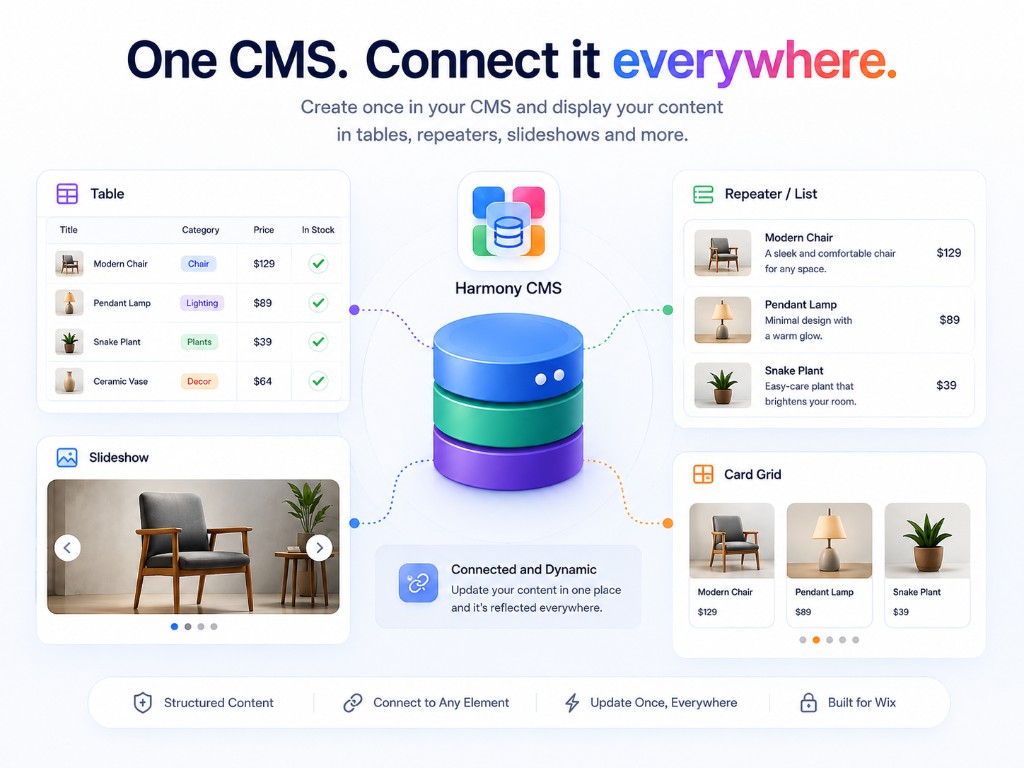
Connected and dynamic
Add these from the app in the Harmony editor. They're purpose-built for CMS — separate from native Text, Image, Button, and other built-in elements. Deep dives live in Docs and the Blog.
Columns from your collection, with search, filters (top or side), Color and Video columns, sorting, mobile layouts, optional Data refresh, links to Dynamic Pages, and Pro Add to cart / Buy now.
How-to guide →Map any collection fields into a repeating layout — Address text or maps, Color swatches, Video playback, card backgrounds from an image or video field, search, filters (top or side), Data refresh, custom in-card placement, links to item pages, and Pro Add to cart / Buy now.
How-to guide →Feature collection items with navigation, pagination, optional autoplay, Video slides, search and filters (top or side), Data refresh, clicks through to Dynamic Pages, and Pro Add to cart / Buy now.
How-to guide →Grid, masonry, collage, slider, and more from Media Gallery fields or images/videos across items — with lightbox, Video playback, search and filters, Data refresh, item-page clicks, and Pro Add to cart / Buy now in the lightbox.
How-to guide →Month or week views from DATE or DATETIME fields — search and filters (top or side), Data refresh, multi-day events, event details or Dynamic Page clicks, and mobile-friendly layout.
How-to guide →Show one collection item per URL with Hero, Split, Stack, or Minimal presets — Address maps, Color and Video fields, custom HTML/CSS, optional Data refresh, per-item SEO from fields, and Pro Add to cart / Buy now.
How-to guide →One Form element: connect a collection, choose fields and labels, and let visitors submit — including Color, Date/Time, Number, URL, Video, and image uploads. Optionally Autosave, Multi-step form with Show only when conditionals, Update displays on this page, Create contact or Create member, and fire a Wix Automations Form submitted trigger. On Pro, Enable payments for pay-on-submit via Wix Checkout.
How-to guide →Pro: Enable payments on a collection for Add to cart / Buy now on displays, or on the Form for pay-on-submit — powered by Wix cart and checkout.
Payments docs →Describe what you want in plain language — AI setup configures Table, Repeater, Slideshow, Media Gallery, Calendar, Dynamic Page, and Form, lists what changed, can create or add collection fields in one click, then you can refine in Manual.
AI setup →Connect Google Sheets, Airtable, or Notion under External databases, then set Table, Repeater, Slideshow, Media Gallery, or Calendar to External Database.
External databases →Pro · Payments
Map your collection’s Name and Price fields with Enable payments, then show payment actions on Repeater, Table, Dynamic Page, Media Gallery, and Slideshow — or collect payment when visitors submit a Form. Cart and checkout use Wix — no separate Stores product catalog required for CMS items.
Setup
Add CMS for Harmony from the Wix App Market on your Harmony site.
Define collections, optionally add a native dynamic page for each item or Enable payments for catalog checkout, and add items in the CMS dashboard.
Add Table, Repeater, Slideshow, Media Gallery, Calendar, Dynamic Page, or Form and connect a collection — or use AI setup and refine in Manual.
Ship once — every connected display stays live with your CMS data.
FAQ
Table, Repeater, Slideshow, Media Gallery, Calendar, Dynamic Page, and Form. Cards means a Repeater layout, not a separate widget.
No. CMS for Harmony ships app widgets only. It does not connect native Harmony Text, Image, Button, or other built-in elements to CMS fields.
Yes. CMS for Harmony works on Wix Classic (Editor), Wix Studio, and Harmony. Install from the App Market on your site and add the widgets in that editor.
In the collection, choose More actions → Add collection page. Add the Dynamic Page widget to that native page, set Page path to the page path, and set Page link field to Item slug. Link from other widgets the same way, and optionally map per-item SEO from collection fields.
Yes. Table, Repeater, Calendar, Media Gallery, and Slideshow support search and filters (including top or side layout). The Form widget saves submissions — including Color, Date/Time, Number, URL, Video, and image uploads — into a connected collection; supports Autosave, Multi-step form, and Show only when conditionals; and can Create contact, Create member, or fire a Wix Automations Form submitted trigger. On Pro, Form pay-on-submit opens Wix Checkout after save.
Yes. Open the widget settings and choose AI setup. Describe what you want in plain language — binding, fields, layout, filters, design, and more. When the assistant suggests a collection or missing fields, you can create or add them with one click. Switch to Manual anytime. Uses this site’s Wix AI credits.
Yes on the Pro plan. Use Enable payments on a collection to map Name and Price (optional Description, Image, Quantity), then turn on Add to cart / Buy now on Repeater, Table, Dynamic Page, Media Gallery, or Slideshow. Checkout uses the site’s Wix cart and checkout — live site only. Forms can also Enable payments for pay-on-submit (separate from catalog CTAs).
Yes. Connect Google Sheets, Airtable, or Notion under External databases in the dashboard, then set Data source to External Database on Table, Repeater, Slideshow, Media Gallery, or Calendar. One connection is included on Free and Supporter; Pro unlocks unlimited. Form and Dynamic Page stay on Wix CMS.
Feedback
Bugs, ideas, or anything in between — we read every message. Or join the App Forum.